Building your starter vocabulary
How to make sure your coverage is accurate on a fresh new account
Updated
This is the most important guide to have accurate coverage. It ties the rest together: telling Jiten what you already know, picking something to read or watch, making it into study material, and updating your knowledge from it.
Step 1: Tell Jiten what you know
Coverage is the best way to navigate between media you can immerse in. Setting up your knowledge to reflect it accurately will only take a few minutes, depending on where you come from.
Word sets
Word sets are way to update your knowledge on whole categories, or ignore ones you don't plan to study.
You can find them in Settings → Word Sets. The Particles & Common Grammar set is highly recommended unless you're just an early beginner in Japanese. If you've finished the Kaishi 1.5k deck then click on Mark as Mastered next to it. You can also master it if you didn't do it but have done a similar core deck or already have intermediate knowledge of Japanese. The Names one can be interesting to blacklist if you don't care to be learning names individually, as they can represent large parts of some decks and mess with your coverage. Each set can be set to Blacklist or Mark as Mastered, and both count towards coverage, so the choice is about whether you consider you know the words or you just don't want to see them.
Leave sets you only partly know, like Onomatopoeia and Counters, alone, unless you want to completely ignore them. See Word sets.
Import what you studied elsewhere
If you have an Anki or JPDB history, you can easily bring it over. See Importing known words from Anki or Migrate from JPDB to Jiten. It is a one-off manual import in both cases and only takes a few seconds to sync your progress.
With no history at all, Settings → Vocabulary has a Frequency Range option that marks a band of the most common words as known. It takes a start rank and an end rank, and caps at 10,000. It is a rough approximation of your knowledge, and the higher the rank the less global frequency will match you depending on the genres you immersed in, but it beats an empty account.
Titles you have already finished
The best source of your real knowledge are works that you have already finished. Open any media, press Download / Learn, and pick the Learn format, which applies the selection to your account instead of downloading a file. Choose the Occurrences strategy, set a Threshold, leave Vocabulary State on Mastered (never forget), and press Apply to Vocabulary.
The threshold is your judgement call to make about that specific title. The default of 10 is a safe setting for something you found hard. Somewhere around 3 suits a title you found comfortable, since a word you met three times in a work you followed easily is probably one you know. Going lower catches more of what you picked up at the cost of erroneously marking some words you did not.
Learn overwrites words you are part-way through studying, turning them Mastered. Selecting it ticks Exclude Mature, Mastered & Blacklisted Vocabulary, which protects those three states only. Tick Exclude All Tracked Vocabulary as well to leave everything you already track alone.
Repeat for a handful of finished titles from different genres. Returns drop off sharply within one series: the first volume may add thousands of words and the fifth almost none.
Afterwards, open the Coverage tile in your settings and press Refresh now. Learn does not trigger a recalculation by itself.
Fine-tuning as an option
On a title you have finished, open its Vocabulary list, set Display to Only Unknown and sort by Deck Frequency, which puts the most frequent first. That is exactly the list your occurrence threshold skipped. Walk down it and Shift+Click the ones you actually know. The definition sits right next to each word, so it is easy to credit yourself with something you only half recognise; leave those unknown.
The same list on a title you are about to start is usually character names and a few common words, and marking those gives you a much more honest coverage prediction before you start immersing in it.
Step 2: Pick something
Open Media, filter to a type and genre you actually want, and look slightly below your comfort level. Choosing media at your level explains how to weigh difficulty, coverage and length together, and its rule of thumb is a good default: at least 80% coverage on the shortest title you are genuinely excited about.
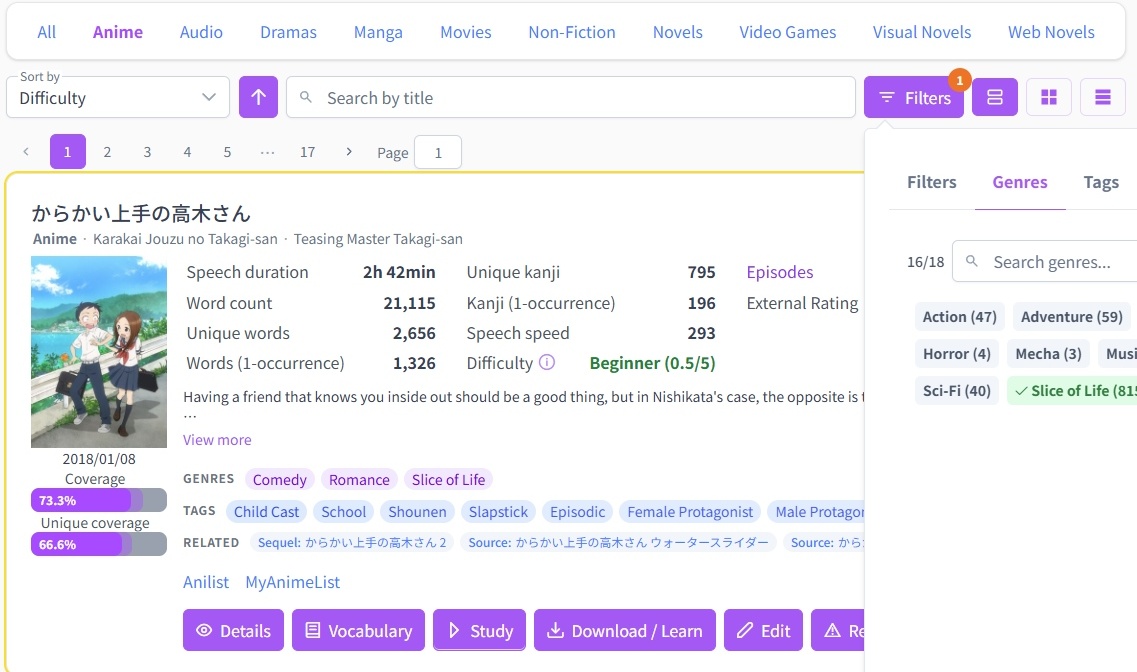
The chart button on a media card opens its statistics, where Milestones tells you how many of its most frequent words it takes to reach 80%, 85%, 90%, 95%, 98% and 99% coverage of it. That is the generic amount of word for everyone, and is less personal than your own coverage.
Step 3: Pre-learn the top words
Sort a title's vocabulary by Deck Frequency and the words at the top are the ones that repeat the most throughout that specific work, so your comprehension will improve the fastest.
You can then easily turn it into study material, with 2 methods:
- Built-in SRS (recommended): Add Deck → Media Deck → Filter Mode: Target Coverage See Using the SRS.
- Anki: generate a deck. Tick one of the two exclusion checkboxes, since neither is on by default and the deck otherwise includes words you already know. Picking the Coverage % strategy handles that for you and hides both checkboxes.
Step 4: Immerse and review as you go
This is the part that actually teaches you Japanese. Look words up as you meet them, mine the ones worth studying, master the ones you find you already knew well. The Jiten Reader extension does all of that on the page itself.
Step 5: Finish a title and start again
Congratulations, you now have finished a title in Japanese! You can set it to Completed under Set status in the More options (...) menu on the media. This will add it to your profile stats. You might be prompted to rate the difficulty of the title (see difficulty scores), don't stress it too much but try to answer honestly. This makes the experience better for the ones that will come after you.
If you didn't study it as you immersed, it might be a good idea to use the Learn option described above to have a more accurate coverage on your next titles.
Where to go next
- Choosing media at your level: in-depth guide on how to choose the right media for you.
- Tracking what you know: every word state, and every way to mark one.
- Using the SRS: daily reviews and study settings.
Ask on Discord if you get stuck on any of it.