What's New

New features, improvements and fixes on Jiten.

  • Dozen of parser fixes, thanks to @nerenar for the PR! The decks are not reparsed yet, so only visible in Jiten Reader and other parsing pages
  • Added esc and enter key to quit or continue at a batch checkpoint
  • Redesigned the media list filters to be more space efficient on desktop and more useable on mobile
  • Added filter presets that you can save and load, as well as put as default for your media list
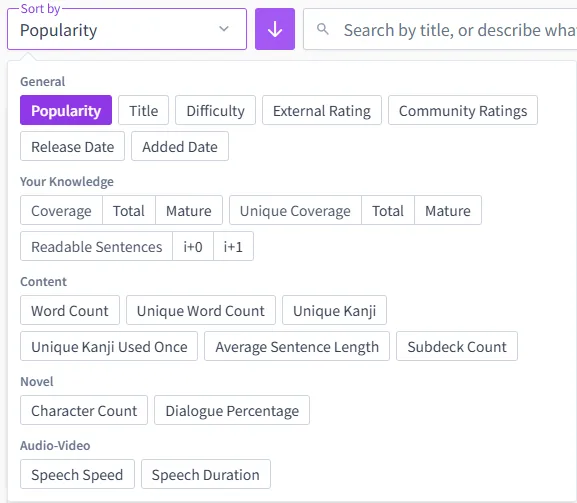
  • Added total coverage & total unique coverage filters
  • Separated the favourite filter from the other status
  • Small redesign of the request pages
  • Fixed a discrepancy between your total vocabulary and your words learned over time in your profile
  • Fixed label abbreviations that didn't show the full name in the tooltip (example: form/formal)
  • Fixed all definitions of a word appearing gray when reading restrictions are present
  • Dozen of other bug fixes

Next Up: YouTube decks will be added, you can already make requests for those. Accepting full channels or specific playlists. They need to have manual subs, and not auto-generated ones, and the focus will be first on longer ones or ones that have at least a significant amount of speech (> 10 minutes per video avg).

The poll on the community forum also has positive results, so I'll be working on that. It won't replace the Discord, but give a place to people that are not on it as well as a way to have conversations searchable and indexable on the web in the long term. This won't affect the Discord in any way and it'll continue to work the same way as it does now.

Frequency Upgrades

As often requested, you can now view the frequency by media type of any word. There's several ways to go at it:

  • On any vocabulary detail page, you'll find a small chevron (v) next to the frequency, that you can click to see a breakdown for all media type, as well as your saved frequency lists with Jiten+. You can click one of them to make this your default, and it will then show everywhere on the website and in Jiten Reader and JitenMPV, replacing the global rank.
  • In a vocabulary list, if you set the sorting by Global Frequency, you'll then see a new box where you can change the rank source (this one is temporary)
  • In your Settings > Vocabulary, you can change the Frequency Source

You can also now create a deck from these frequencies instead of just the global ones, as well as from your custom frequency lists if you have Jiten+.

Media List Upgrades

Under your settings, you will find a new Media List feature where you can import your media lists directly from AniList, VNDB or a previous export. You can also export your full list to JSON or CSV.

The import is filled with filters so you can easily import exactly what you want, for example only the manga and not the anime, or you can set a start date if you used to watch anime in English, and set exactly the status you want to import.

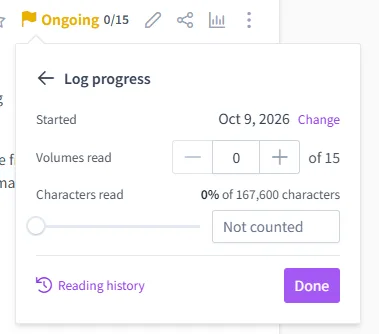
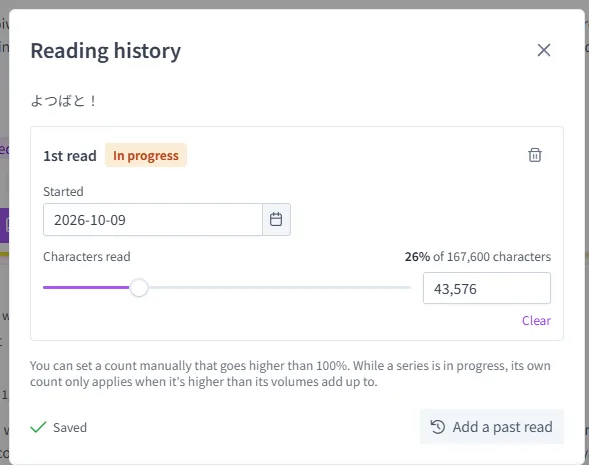
For AniList, if you have an ongoing title, you can also mark the individual episodes/volumes as finished (with the limitation that they must be on Jiten and that there's no gap in-between the volumes).

On top of that, in your profile > media list, you can now bulk edit it like removing multiple titles at once or changing their status.

Other Updates

  • Added community polls which is a way to gather you guys opinion anonymously on future things, or just get to know you better. There's currently 2 polls, go vote!
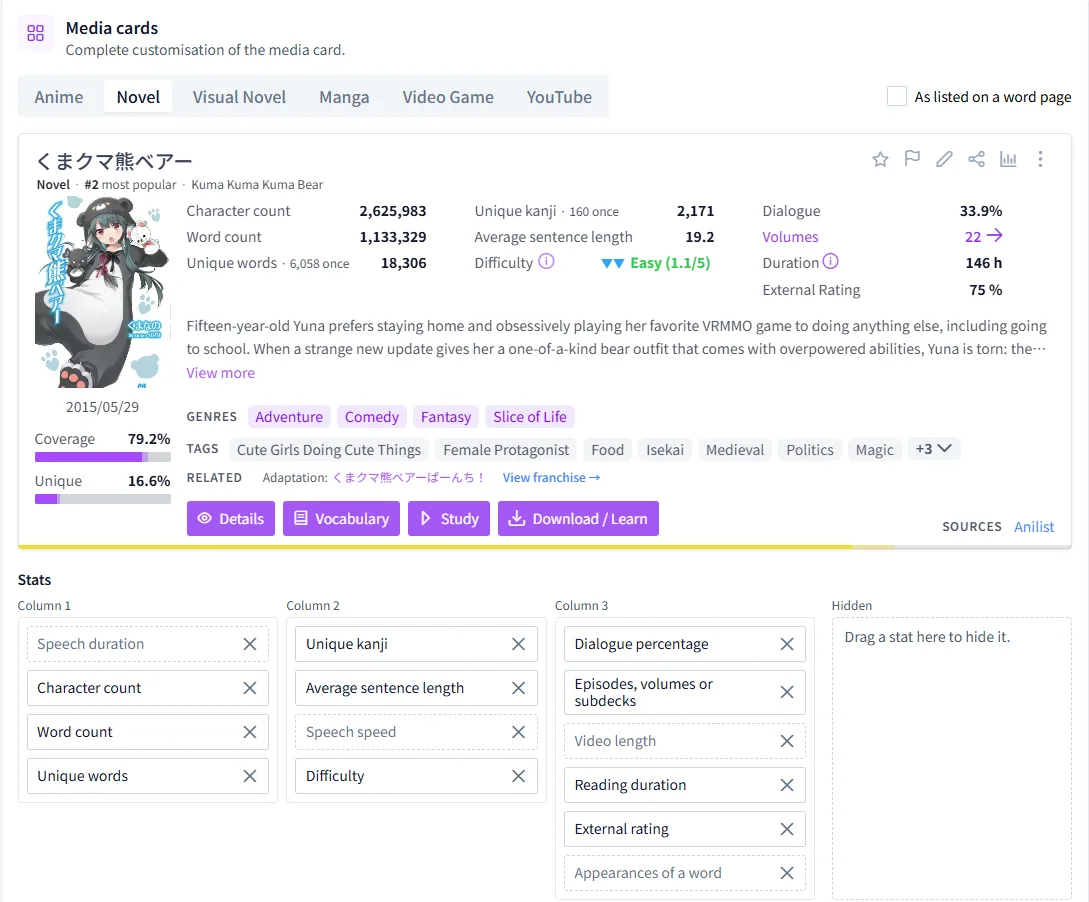
  • Redesigned the media cards for a slimmer profile able to fit more on screen at once and a bit less rainbow-y while keeping all the info present
  • Added an option to refresh an individual deck's coverage under the burger (...) menu of any deck
  • Added buttons to change the font size for custom dictionaries
  • Added a slider to change the TTS volume
  • Added buttons on the immersion plans to add the decks to your study list directly with the correct amount of occurrences
  • You can now easily pick decks from your media list when creating a custom frequency list
  • Added a voted on tab in the media requests
  • General website optimisation, page loading, especially cold, should be a bit faster
  • Redesigned the guest homepage to better reflect the current Jiten features + added a features page
  • Fixed a bug causing media with furigana (mainly novels) to have an higher difficulty than intended, you might see it go down on novels from the last few months
  • Fixed an issue where the difficulty adjustment wouldn't show the sign if it was exactly 0.1
  • Fixed the play order when using custom audio (now always headword > custom > example sentence if all 3 are on)
  • The omnisearch is now focused by default on the homepage
  • Small CSS fixes all over the website, especially for mobile
  • Tons of small other fixes

As always, thanks for your support and feedback!

As a reminder, the Jiten+ Lifetime offer will go away at the end of the month, although it might come back for very special occasions. If you want to get it, now is the time!

edited August 13, 2026

Thank you all for your overwhelming support during Jiten 1.0 launch!

Card Archives

Until now, card you were forgetting or that were being automatically replaced (redundant etc) were completely deleted along with your review history. From now one, they will be put into an archive, which will allow you to easily restore them and their entire history if you've made a mistake, as well as keep them counting for your stats, your study streak and your FSRS optimisation. You can find your card archives under your Settings > Vocabulary > Recently Removed You can also restore them in 2 clicks on a vocabulary page of a card that has been archived, via the ... menu

Expanding Redundancy

Redundancy is also being expanded. In your Settings > Vocabulary you'll find a new "Derived & Related Words" section. It combines multiple types such as potential/passive forms (見る → 見られる), **honorifics **(酒 → お酒), for a total of 11 categories. You can activate those you want to be counted as redundant, depending on your level of knowledge and your learning style. You can easily see the full list of words, and the direction of the redundancy: some are bidirectional but a lot are also one-way, because the base words often covers more meaning that its derived forms. You can toggle them on and off without losing any data, as long as you don't manually remove the redundant card (which will be sent to the archive then), so feel free to experiment! There's also a new Redundant Forms > Check my vocabulary button that can help you clean up your old cards in a click. If you find yourself having to review words that should be redundant, you probably need to remove them (they will be put into archive) from there.

Other Changes

  • Updated JMdict & JMNedict, dozens of parser fixes, all decks reparsed. Be sure to update your frequency dictionaries!
  • Added example sentence import with AnkiConnect
  • (Jiten+) Added image & audio import with AnkiConnect, you can skip your cards that already have media, replace them or choose individually
  • Added export of custom example sentences & custom word notes/meanings to full vocabulary export
  • Reworked knowledge filters in vocabulary pages to allow for combining multiple states (i.e. show mature + mastered)
  • Added the same series and same settings relationships for visual novels
  • Added subdecks (i.e. volumes, episodes) completed count in your profile on top of the series
  • (Jiten+) Custom audio is now played by default and headword & example sentences are not played (configurable in settings) when you have a custom audio present for the card
  • (Jiten+) Adjusted the minimum cost of media in immersion plans to lower movies recommendation rates + added a configurable max titles for the Target media mode
  • Added a random option for tts that plays a different voice every time
  • Added a replay audio keybind during SRS study (R by default)
  • When you click see more examples during SRS study, sentences from your study decks will be displayed in priority. Also added a new setting to see completely random sentences instead of the ones from your study decks
  • Added controls to your study decks list to move a deck to the top/bottom or a specific position
  • Fixed the "cliffs" when you bulk mastered words in coverage journey & your total words learned. They will now be displayed as prior knowledge
  • Fix bury not working when group reviews by day is on
  • Fixed a bug where words could be duplicated at the end of a batch
  • Optimised the study summary on the frontpage for faster loading
  • Optimised example sentence fetching during SRS study for faster loading
  • Multiple UI fix & changes, mainly for mobile
  • Other small fixes

As a reminder, you can try Jiten+ for 14 days for free with the code JITEN2026, available until the end of the month!

Jiten

Jiten is now officially out of beta! This doesn't change anything and the site will continue being developed at the same pace, it's just that all the features I imagined when I started working on it are now available and polished.

  • New guides page containing guides covering in-depth most features of Jiten. Tell me if you notice errors or things you'd want to be covered!
  • Added "What's new" on the website to see the latest updates (same as on discord but text only)
  • You can now hide individual definitions from the default dictionary in any vocabulary page. They will be grayed out in vocabulary page and completely hidden in the SRS
  • Reworked the navigation in media & vocabulary lists to be easier and more compact, especially on mobile
  • Reworked the settings index page to be clearer and more compact
  • New dashboard as homepage when you're logged in
  • Made the search accessible globally from the header with the search icon
  • Added names & other missing parts of speech to parts of speech vocabulary filters
  • Added a sort by community rating amount in media lists
  • Separated coverage & unique coverage sorting to Coverage (young + mature) and Coverage (mature only) in media lists
  • Added a screenshot function to the profile page, accessible to the owner only, giving an easily shareable overview of your profile
  • Added the vocabulary count & words learned over time to the profile page
  • Genres & tags now have the number of media available between parenthesis and are hidden if there's 0 hits
  • Added subdeck search & sort if there's more than 1 page of subdecks
  • Added sort options to the profile media list
  • Added the display of your own request in the media requests contribution tab with a checkbox to hide them
  • Moved the ratings in the header to the profile button
  • Fixed charts in the media stats page having white background in dark mode
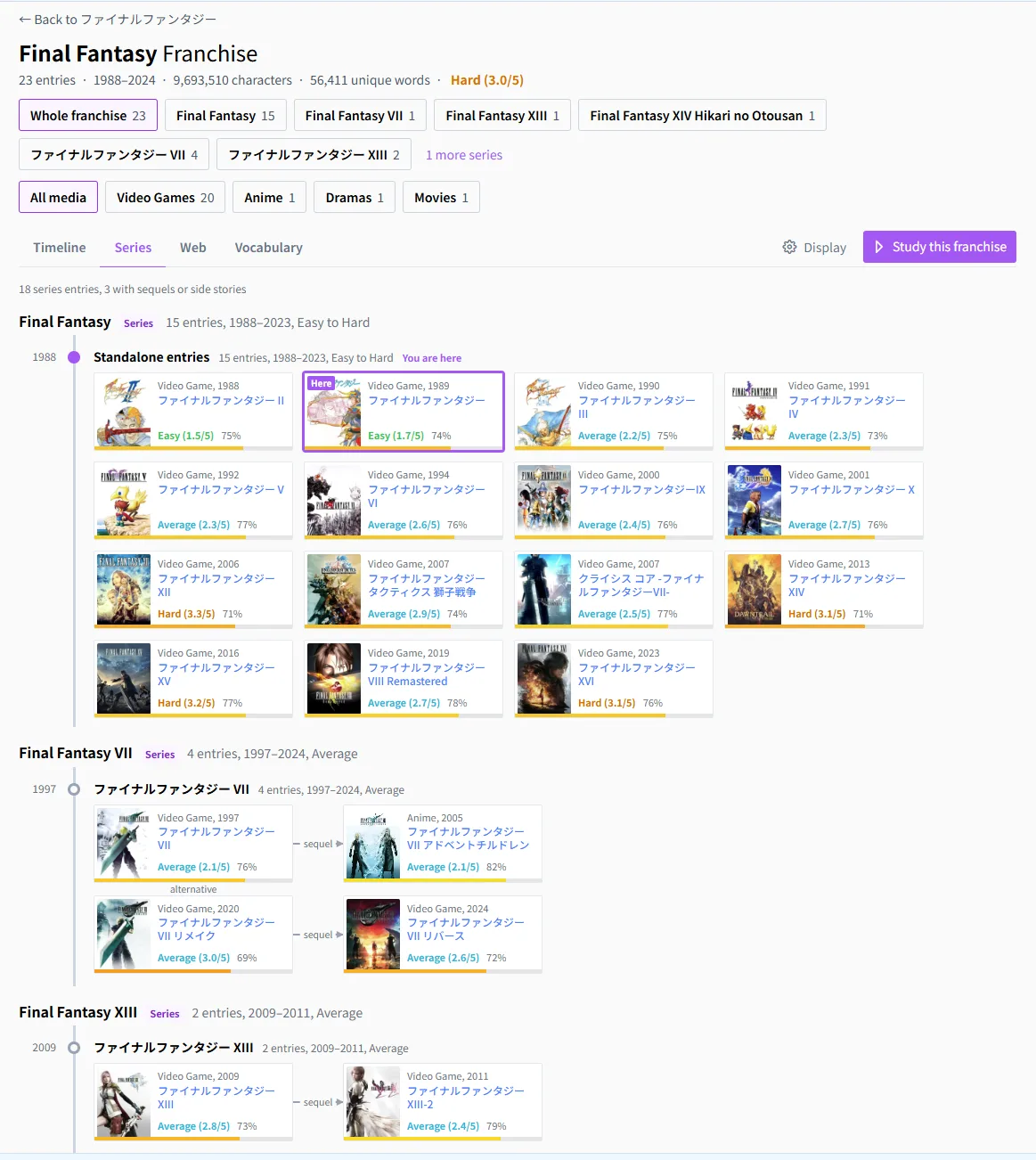
  • Fixed a bug in the franchise view where entries could overlap
  • Fixed the label overlapping in vocabulary from completed media
  • Dozens of other bug fixes and improvements

SRS

Jiten Study is a powerful and deeply customisable SRS system built on top of FSRS-6. It leverages all the functionalities of Jiten to give you a superior and always up-to-date experience.

  • Now available to everyone, no more need to enroll into it!
  • Study decks from any media present on the website, your study decks get updated with the parser and dictionary
  • Create decks from a range of the global frequency list
  • Create a completely custom word list, where you can import texts or mine from Jiten Reader or JitenMPV
  • Benefit from all the Jiten features such as the example sentences, kanji breakdown, word composition, etc
  • Study words only in your decks or from everything you have tracked
  • Customise your experience completely with dozens of easy to understand settings
  • Switch from standard cards to write-in reading and write-in meaning cards
  • Advanced features such as completely changing the layout of cards
  • Fully customisable keybinds
  • Optimised experience for weak connections, with prefetching and client-side actions
  • And much more!

Jiten Study is completely free except for the upload of screenshots & audio which require an active Jiten+ subscription.

JitenMPV

JitenMPV is a plugin for Jiten bringing you the power of Jiten Reader directly in your favourite media player. JitenMPV is free & open-source https://github.com/Sirush/JitenMPV. It is currently in beta and only thoroughly tested on Windows, you help to test other versions would be appreciated!

  • Colour words by status
  • Hover any word to see their definition and review them
  • One-click mining to a word list with the subtitle as example sentence
  • Jiten+: while mining, also capture a screenshot or animated screenshot and the audio and add it to the word
  • Blur words depending on their status to help you rely on subtitles less
  • i+1 sentence marking, top frequency words marking
  • Dozens of settings for a customised experience and more features to discover!

Jiten+

Jiten+ is a premium subscription that will offer you some perks and allow me to continue working fulltime on Jiten. Available for 5€/month or 50€/year, with a 150€ lifetime offer available until the 31th August 2026. Jiten+ subscription are done on the website through Stripe. Current ko-fi/github/patreon are still available but are donations only if you want to give an extra, they won't grant Jiten+ subscription. Jiten's core is still free and will continue to be, Jiten+ is a way to offer more features to power users and features that would have been too costly to add otherwise. If you ever stop subscribing to Jiten+, you will keep your uploaded media, you just won't be able to add more.

Here's the launch feature list of Jiten+, with more to come in the future:

  • Upload images, animated images and audio to words, that you can see on the word page or during SRS. Max. 1 image & 1 audio per word form. 10GB of storage space alloted (300MB during trial) which is enough for tens of thousands of cards.
  • 5 requests boosts a month, equivalent to 5 votes, so your requests have a chance to be fulfilled faster
  • Create custom frequency lists mixing media types, genres, tags, difficulty, release year filters, or pick multiple decks manually. You can save & recreate in 1 click up to 25 lists, share them with people with a link, and set up to 3 to auto-update when new decks are added.
  • Immersion plans: using your known words, create immersion plans algorithmically with lots of filters & options of what to immerse in next, with 2 modalities:
    • Pick titles to immerse in next depending on your filters and your media list, in order to learn the most amount of words in an optimised manner
    • Pick a target media you want to read, the algorithm will devise an immersion plan so you're able to read it with the most amount of coverage in the least amount of steps
  • Cover journey: using your words history, shows your coverage over time under every deck, as well as milestones (e.g. reached 80% coverage of Steins;Gate the 3rd of July 2026) in the media stats page
  • Higher limits: 200 study decks, 300k word lists vocab, 30 active media requests, 10 custom sentences per word

If you're unsure if Jiten+ is right for you, you can use this code in settings > Jiten+ to get a one-time 2 weeks trial: JITEN2026. The trial has a storage limit of 300MB (vs 10GB for the subscription) and can't save nor auto-update custom frequency lists (only download them). This trial code is valid until the 31th August 2026.

Of course, I haven't forgotten all of you who made it possible for Jiten to grow that far. If you are a significant contributor or you've donated in the past, you'll get a one-time gift (check your notifications or e-mails). If you have donated but haven't received anything, check your private messages in the platform you've donated in, your Discord DMs or send me one if there's nothing there.