Difficulty ratings
Understand how difficulty ratings work and vote to adjust them
Updated
Every title's difficulty starts as an algorithmic score from a model trained on Japanese text. Your votes help adjust it. The number shown on a media page is that score plus the community adjustment, so votes can change where the title sit to reflect a learner experience more accurately if the algorithm got it wrong.
By making an account and marking some titles as Completed, Set status in the More options (...) menu on a media card, you can start rating too.
Comparing two titles
While there are multiple ways to rate titles, comparing them by pair is the most accurate one and is the one with the most weight in the adjustment.
You can open Ratings in the header's profile button to start seeing comparisons of your completed titles under the question "Which did you find harder to understand?"
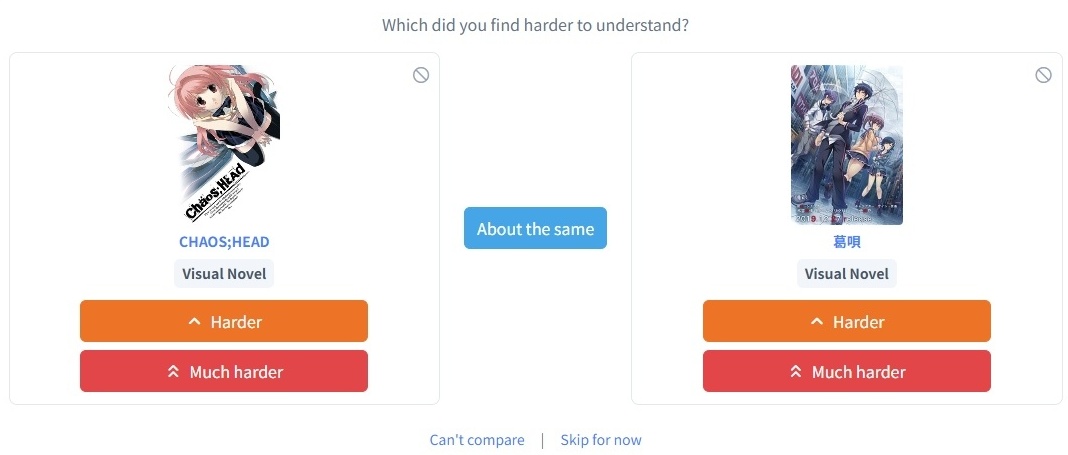
Below each cover, you'll find several buttons:
- Harder and Much harder let you choose which title you found harder.
- About the same means you didn't find one much harder than the other.
- Skip for now sets the pair aside for 7 days, so you can come back to it with a fresher mind.
- Can't compare removes the pair from comparison completely.
- The block icon on a cover blocks that title from comparisons altogether, for a title you finished too long ago to reasonnably compare or just don't want to see.
Both skip buttons add an entry in Review skipped pairs on the ratings page and in the Skipped tab of your history, so you can restore it at any time if you've made a mistake.
Voting on the same pair a second time will replace your old answer. You can choose a pair manually with the Compare specific titles block on the same page.
Ranking in bulk
The ranking page presents your completed titles out as a tier list, with a tab per group that don't mix well: Prose, Visual Text, Audio Visual and Non-Fiction. Drag a title out of Unranked onto a rank for title with a similar difficulty, or into a gap between ranks to give it a rank of its own.
A pair you compared manually will always outrank comparisons realised in bulk. This is a quick way to rank your list if you have hundreds of titles, but since it's less precise, it also has less weight in the voting system.
Rating a single title
Marking a title as Completed opens the Rate Difficulty dialog if you have not rated it before, offering Beginner, Easy, Average, Hard and Expert. The same five appear under Rate completed on the ratings page, with an Undo for about 30 seconds after you pick one.
Direct ratings can be changed later. They provide less weight than pair comparison but are a quick way to note down how it felt to you right after finishing it.
Your history
My Votes has four tabs: Comparisons, Ratings, Skipped and Blocked. Comparisons can be deleted, ratings changed in place, skipped pairs removed, and blocked titles unblocked.
Where your votes show up
Next to a title's difficulty, the arrow ▲ means readers found it harder than the algorithm predicted, ▼ easier, doubled arrows for a wide gap, and ≈ that the votes confirm the score. Choosing media at your level covers reading them from the other side.
Your own votes stay private. What is public is the adjustment itself and the number of people who voted, with no names attached.